Posts

Showing posts from 2011

SSRS check for NULL or Empty String

Image
Alright..I have a column called "Comments" and need to hide that column if it's NULL or empty or have spaces! Solution: Just set the visibility expression to: =IIF(Fields!Comments.Value = "", IIF(Fields!Comments.Value is nothing, IIF(Len(Trim(Fields!Comments.Value)) = 0,True, False), False), False)

Submitted a SQL Tribal Knowledge abstract

Jen McCown ( Twitter | Blog  ) is calling all the unpublished SQL Server folk and non MVPs! She has this brilliant idea about a community-written book of tribal SQL Server knowledge. http://www.midnightdba.com/Jen/2011/11/sql-tribal-knowledge/ Anyway I've managed to contact her and she was generous to accpet my 3 abstracts after she closed the submition timeline. I'm So excited that I could write for the SQL community and share the knowledge,These are actually what came to my mind back then, but really regret not sending anything about SQL 2012 as it would be more suitable. Title: SSIS notifications, using “SEND MAIL TASK”. Category: Advanced SSIS Level: 300 Goal: Learn about the various ways and the capabilities of SSIS notifications. Abstract: Examining the common and the possible ways to send e-mail notifications for various scenarios, on error, on success using the built in “Send Mail Task” and learning abut it’s limitations, the way...

SSRS can be also used for user inputs!

Image
A recent question popped up and the discussion heated up regarding updating a COMMENTS (TXT) field in a table using SSRS. http://www.experts-exchange.com/Microsoft/Development/MS-SQL-Server/MS-SQL_Reporting/Q_27475269.html?cid=1572#a37227028 Of course it’s not the best way to use SSRS as it’s a presentation layer and so limited in doing that using Parameters and sub-Reports which will fire a code or a stored procedure to update or delete a record…but IT COULD BE DONE!! And that’s what I was bargaining about… 1-I started by creating a new project in VS 2008, “Report Server Project” type.    2-I’m using SQL 2008 R2 as my testing platform…I’ve created a test DB called “Admin” CREATE DATABASE [Admin] 3-I created a test table called “Employees”  contains only 3 columns. Create TABLE Employees     (     ID int IDENTITY (1,1),     Name varchar(50),     Comments varchar(MAX)     ) ...

Search every table and every CHAR columns for a keyword!

I needed to search for a specific keyword and didn't have the chance to know what's the table's name or even what's the column's name!! Just replace the KEYWORD in the below query to your needs. DECLARE @Schema varchar(3) DECLARE @Table Nvarchar(max) DECLARE @Column varchar(30) DECLARE @Keyword Nvarchar(30) SELECT @Keyword = 'BMAC2120-01' DECLARE Curs CURSOR FAST_FORWARD FOR SELECT  s.name As [Schema], o.Name AS [Table],c.Name AS [Column] FROM sys.columns c JOIN sys.objects o ON o.object_id = c.object_id JOIN sys.schemas s ON s.schema_id = o.schema_id WHERE o.type = 'U' and c.collation_name IS NOT null ORDER BY o.Name,c.Name OPEN Curs  FETCH NEXT FROM Curs  INTO @Schema,@Table, @Column WHILE @@FETCH_STATUS = 0 BEGIN SELECT @Table = 'SELECT top 5 [' + @Column + '],''' + @Table + ''' as [Table Name] from ' + +@Schema +'.' + @Table + ' where [' + @Column + '] LIKE ''...

T-SQL Combine Date with Time

I've a case where I have 2 columns, Date and Time. Date column's datatype is DATETIME Time Column's datatype is INT Example: Date:  2009-04-14 00:00:00.000 Time:  can be 743  or  0834 I need to combine them in one DATETIME column. Select 'DTColumn' = CASE WHEN len(convert(varchar(12),Time)) = 3      THEN cast(CONVERT(char(8),Date, 112) + ' ' +       convert(varchar(10),Substring(convert(varchar(12),Time, 108),1,1) + ':' + right(Time, 2) + ':00'      ,108) AS datetime)      WHEN len(convert(varchar(12),Time)) = 4      THEN  cast(CONVERT(char(8),Date, 112) + ' ' +       convert(varchar(10),Substring(convert(varchar(12),Time),1,2) + ':' + right(Time, 2) + ':00'      ,108)  AS datetime)          End from Table That'...

Error rows, Code and Description in SSIS

Image
1-double click the OLE DB destination to bring it's properties. 2-go to "Error Output" as highlighted in the screenshot, "select "Redirect Row" from the drop-down menu. that will redirect the bad rows to the output. 3-Add a 'script Component task' , go to the input columns, select ONLY  'Error Code" and 'ErrorColumn'., add an OUTPU column to hold the error description. 4-Go to the script screen, and add the following script, make sure to US VISUAL BASIC 2008 as your input language. 5-paste that script.. Imports System Imports System.Data Imports System.Math Imports Microsoft.SqlServer.Dts.Pipeline.Wrapper Imports Microsoft.SqlServer.Dts.Runtime.Wrapper <Microsoft.SqlServer.Dts.Pipeline.SSISScriptComponentEntryPointAttribute> _ <CLSCompliant(False)> _ Public Class ScriptMain     Inherits UserComponent     Public Overrides Sub Input0_ProcessInputRow(ByVal Row As Input0Buffer)       ...

SFTP in SSIS

You have couple of options... Free option will be a script task to an external WinSCP app, explained in detailes here: http://www.codeproject.com/KB/database/SSIS_SFTP.aspx Paid options: 1-http://www.cozyroc.com/   $399.95 2-http://www.rebex.net/sftp.net/  $349.00 3-http://www.nsoftware.com/ssis/   $249.00 4-http://xceed.com/FTP_NET_Features.html   $899.95 USD

Get excel sheet names in a script taks

Image
Hi, I had seen a question asking about getting all the excel sheet names in a work book, so I've created the attached example package. Basically I'll loop over a specific folder, get all the excel file names into a variable, pass it to a script task to get me the worksheet names.   In the SCRIPT TASK, add a reference to  MICROSOFT.OFFICE.INTEROP.EXCEL Then add this code block.. Imports System Imports System.Data Imports System.Math Imports Microsoft.SqlServer.Dts.Runtime Imports Microsoft.Office.Interop <System.AddIn.AddIn("ScriptMain", Version:="1.0", Publisher:="", Description:="")> _ <System.CLSCompliantAttribute(False)> _ Partial Public Class ScriptMain     Inherits Microsoft.SqlServer.Dts.Tasks.ScriptTask.VSTARTScriptObjectModelBase     Enum ScriptResults         Success = Microsoft.SqlServer.Dts.Runtime.DTSExecResult.Success         Fail...

Strip Time out of date SSRS

I've a column type "datetime" that reads 09/23/2011 12:00:00 AM, need to show only the month and day portion seprated by "/" or "-". There're 2 ways to do it in SSRS: 1-the easiest way :) and the right one too... =Month(Fields!Tuesday.Value) & "/" & Day(Fields!Tuesday.Value) 2-the long fiasco way ! I was just fooling around !! =StrReverse(Replace(StrReverse(left(Fields!Sunday.Value).ToShortDateString,5)),"/","",1,1)) It's your call...

Visual Studio 11 Ultimate Developer Preview

I'm so excited to hear about the new VS 2011, i've downloaded and played around to create new databases and do some stuff in denali and it has the new JUNEAU featues... Give it a shot.... HERE

SSRS - An item with the same key has already been added

Image
Ever got this message and wondered what does it means? The query works fine in SSMS but fails to refresh and update the column names in SSRS !! It happen to be that I've used the same column names in my query, but SQL handled it as I was using a table prefix in my join. Just alias your column names !!!  and remember not to select * !!!

SQL Server 2005 Express Tools is blocking SQL 2008 R2 upgrade!!

I was upgrading SQL server 2008 to 2008 R2, the installtion stops with error "SQL Server 2005 Express Tools in installed"  !! please uninstall, but unfortunately I don't have that!! and can't find it under the list of installed programs in the control panel! Tried the skip check flag "/skiprules=Sql2005SsmsExpressFacet"  with no use !! I took a backup of the whole registry, and removed the whole "Registry Key 90" folder! HKEY_LOCAL_MACHINE > Software > Microsoft > Microsoft SQL Server > 90 It worked!!

SSRS Day name of Date Time

Image
=WeekdayName(datepart("w", Fields!packagestart.Value))

TypeGuessRows for excel! SSIS Excel import NULLS !

I have an Excel file that I want to import into SQL Server. The package works fine! Except it nulls out some columns. and since these columns are null, it's picking null for the rows. interesting, you could change the number of rows that's being used for guessing by the jet engine... http://social.msdn.microsoft.com/Forums/en-US/sqlintegrationservices/thread/54dc94c5-280b-41e5-82fe-26925f9eb95b/ I never had this problem before, so I'm learning now!! Learned that a TypeGuessRows in registry which is 8 by default, and this is number of rows which Jet engine try to fetch "data type" can be changed up to 16. At the following location. HKEY_LOCAL_MACHINE\SOFTWARE\Microsoft\Jet\X.X\Engines\Excel Another property named IMEX which is for Mixed types in excel. actually when Jet engine mark any column as mixed type ( like columns which character and numeric together ), then IMEX=1 excel will always fetch data as text. so use IMEX=1 and set TypeGuessRows as...

SSRS Formatting

SSRS is full of treasures, I recently came accross that great article and wanted to share it.. http://sqlsafety.blogspot.com/2010/02/ssrs-formatting.html Enjoy!

SSIS Process files that has been downloaded in the last hour

Image
A recent question on SQL Server Central  was asking about how to process the last hour downloaded files. I think it's fairly simple using a script task to get the files creation date property, and then added a constant constraint to check the difference between now and the creation date, then pass through to the data flow task to process the file. I've created 6 variables, I'm here getting more usable file properties, but you don't have to do that, I'm just here showing the concept more than doing the exact time difference. Add a "foreachloop Container" and a "script task" inside. edit the "Foreachloop Container" location to your file system location. (the one that has your files). Map the 'FilePath' variable to the output of the "foreachloop" Edit the "Script Task" ,I'm using VB.net language here. Imports System Imports System.Data Imports System.Math Imports Microsoft.SqlServer....

SSRS Data-driven subscription E-mail is not an option

Image
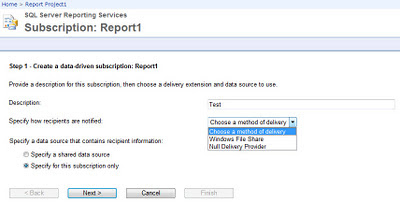
Like the title is saying, when you attempt to create a data-driven subscription in SSRS, E-mail is not one of the listed options. That means you've not configured a SMTP server yet ! Start -> All Program -> Microsoft SQL Server 2008 / R2 -> Configuration Tools -> Reporting Service Configuration Manager Then the option will be Appear as normal. Hope that helps.

Recent Horrible story with my toshiba Laptop!!!

Recently I bought a Toshiba laptop from best buy and that was my biggest mistake, everybody warned me from Toshiba but I didn't listen....  the hard drive crashed after 3 months and it was a nightmare over the phone with them for hours so they can understand what I'm trying to say !!!!! and the guy over the phone kept asking "did you pack your data before shipping the laptop" and he's processing a repair for a crashed hard drive... Also to mention that you'll have to pay $25 so they can provide you with a UPS box and pre-paid shipping label. The whole process took 2 weeks to call, send and receive..... The bottom line that they're cheap company that doesn't stand by their product and by their customers, they dont' care about the customer to leave them without a laptop for 3 weeks!! and you pay to get your stuff fixed while it's still under the warranty !! That's only my personal experience and I'm sharing it for knowledge......

SSIS Performance considerations

Image
Performance is the key factor for any successful data integration project, knowing the type of transformation that you’re using is the first step on optimizing the SSIS flow performance, by utilizing the correct transformation or the design alternative technique you could gain much more performance out of your SSIS flow. The recommendations and suggestions below represents real life experience and excerpts from the Microsoft Technet article : http://technet.microsoft.c om/en-us/l ibrary/cc9 66529.aspx along with influence from the other links referred to at the bottom of this Article. While this Article presents a summary and major points to focus on from those resources, you are encouraged to follow the links for more specific and in depth discussion. SSIS (SQL SERVER INTEGRATION SERVICES) is using a buffer-oriented architecture to efficiently load and manipulate datasets in memory, the benefits is avoiding the I/O to the disk and physically copying the data to the disk, and ther...

Last Day of the Month SSRS Expression....

A question came on one of the fourms about how to get the last day of the month using months as intgers, the person has 1,2,3....etc in his column and need to convert that to month and get the display only the last day of the month in the MM/DD/YYYY format.... Use that for January (1) =Left(DateSerial(Year(Now()), 1, "1").AddMonths(1).AddDays(-1) , 10) Use that for February (2)   =Left(DateSerial(Year(Now()), 2, "1").AddMonths(1).AddDays(-1) , 10)   Hope that helps...

Derived Column to convert string to DB Date.

I have a date field in string format "0MMDDYY" and some value has "0000000". I need to convert the string  to normal db date and also replace "0000000" with NULL. I'm using a derived column, and assuming that the column name is [Column]. [Column] == "0000000" ? "NULL" : (DT_WSTR,2)20 + (DT_WSTR,2)RIGHT([Column],2) + "-" + (DT_WSTR,2)SUBSTRING([Column],2,2) + "-" + (DT_WSTR,2)SUBSTRING([Column],4,2) and if it was an INT field.... [Column] == (DT_WSTR,7)0000000 ? "NULL" : (DT_WSTR,2)20 + (DT_WSTR,2)RIGHT([Column],2) + "-" + (DT_WSTR,2)SUBSTRING([Column],2,2) + "-" + (DT_WSTR,2)SUBSTRING([Column],4,2) That's assuming that your dates are in the year 2000 and above... What if the String has a date such "0110540" The above code will give you 2040-11-05 so we'll have to check and fix the year to 1940 @[User::Column] == "0000000" ? "NULL...

SSIS "MM/DD/YYYY" Format expression.

(DT_DBTIMESTAMP)(SUBSTRING([date string], 7, 4) + "-" SUBSTRING([date string], 1, 2) + "-" + SUBSTRING([date string], 4, 2))

FTP files list to text file using SSIS.

Image
I got a requirment to dump all the FTP file listing for all folders and subfolders to a text file. I'm using here a free FTP server which you could use too ftp://ftp.secureftp-test.com/             User:"test"    Password: "test")                       what SSIS FTP Task can you do nativly? The FTP Task, supports, sending, receiving, deleting folders and directories, but doesn’t support watching for a specific files or getting a list of the FTP directory listing. Get list of files and folders to a text file.  A.Drag a script task  B. Select “Microsoft Visual Basic 2008” as the scripting language, then click “Edit Script” C. Add the following script And the result will be at D:\FTPList.txt  Hope that helps!! Download the package from http://www.box.net/s...